Recent Comments

Showing posts with label Informative. Show all posts

Monday, June 29, 2009

Will Onlive Live Up To Its Expectations?

Imagine a great, new game has just been released and it has been getting rave reviews all over the internet.Your friends are playing it online and it's just the kind of game that you really like, but as it turns out, your PC's hardware does not quite meet the game's minimum system requirements.
The logical next step to take would be to either upgrade your system or forget about the game altogether.Keeping up with latest games and their exponentially increasing system requirements isn't something many of us can easily afford.You will most likely follow the latter route and choose to live without the game at least until your next upgrade cycle when the game will have become totally last year anyway.
But what if you did not need to worry about how much RAM that new first-person shooter needs or which version of Pixel Shaders that fight simulator requires
?What if all you needed to play the latest games were an internet connectio and a game controller?Say hello to OnLive, a cloud-based on demand video gaming service,announced at the Game Developer's Conference (GDC) in March 2009,which could render expensive hunks of GPUs irrelevant.

The Concept

OnLive is an on-demand game distribution service that uses the internet to stream games directly to a user's PC, Macintosh or even television set, without the need for huge, super-heated graphic cards or expensive game consoles.Basically, it is not entirely dissimilar to watching a video on Youtube with high speed internet, except that the player is watching a game that he is playing with OnLive Controller.
"If you compress game data so much that it can be send instantaneously over the internet, then you no longer have to compute the data in a game machine,"Essentially, it doesn't not matter how powerful you even need a computer is or whether device can stream video you can play any game online at any time.OnLive plans to host the games from their high and servers, using proprietary patent-pending technology to stream out the encoded video and audio. Customers only need browser plugin, a micro-console and an internet connection that can handle the incoming video at least 1.5 Mbps for standard definition or 5 Mbps for high definition (HD) the kind of speeds that are beginning to be available in Pakistan.The company promises high quality graphics and no noticeable lag regardless of your computer's hardware.If that isn't impressive enough, think about the amount of processing that goes into rendering a modern 3D game, Consider the average cost of a good graphic card (150 to 200) US $, central processing unit (CPU), RAM, sound card, hard drive space, cooling and the electricity to power all of that.On the contrary,On Live promises to minimize that cost and move it up to the 'cloud' a fancy term used for remote computing on a data centre instead of on your local computer where it is cheaper and more efficient.

Too Good To Be True

It sounds almost too good to be true and most people would be tempted to dismiss the whole outfit as a silly little start-up looking for publicity by making outrageous claims.This attitude would be understandable, if it were not on OnLive Inc's executive team of noted industry professionals.Steve Perlman,the man behind WebTv and Apple's formidable Quick Time Format; Mike McGarvey, former CEO of Eidos Interactive; Tom Pacquin, one of the key developers of Netscape and founder of the Mozilla Foundation, John Spinale former director and executive producer at Activison; Paul Weinstein, executive VP of business development at MySQL; and Charlie Jablonski, winner of 4 Emmys for his work on the NBC broadcast of the Olympics.These are just some of the individuals who bring their creativity and experience of OnLive.
Furthermore, OnLive is backed by big name partners such as Electronic Arts, Ubisoft, Eidos, Atari, Nvidia, Take-Two Interactive and THQ.Clearly, OnLive is on to something.'It took years literally working with each of these publishers," says Perlman."They have verified there are no smoke and mirrors; that the tech works in a normal home, the business model is viable, and the quality of the gameplay is as good as or better than a PC or console."
For Game publishers, the popularity and usage of Onlive means that they no longer have to worry about piracy.It also means access to a whole new market of gamers who are not willing to invest time or money to keep up with rapidly changing gaming hardware. Some of the games that are currently available on Onlive private beta are Crysis Warhead, F.E.A.R 2:Project Origin, Prince of Persia , Burnout Paradise and Major League Baseball 2K9 some of which are demonstrated on a MacBook Air at GDC 2009.
The Biggest Issue gnawing at OnLive's credibility is concerns of cost and gameplay experience.The principle behind the service is based on the premise that a game can be computed, encoded and then streamed over the internet is almost real time, with no noticeable lag, to customer as much as 2,400 kilometres away.Still, critics like Richard Leadbetter and Eurogamer.net argue that the requirement on OnLive's data centres will be phenomenally high

Will It Work?

The biggest question on everyone's mind right after pricing, which the company isn't discussing right now, is whether it will actually work. Perlman's outline of the technology during the demonstrations at GDC indicate that it very well could. Many technologists and enthusiasts would certainly like it work as advertised. Until the service is officially launched, however, all one can do is speculate. In addition to the latency issues and broadband requirements, there are also concerns of interrupted gameplay and saved game files. Those are issues that haven't been openly addressed by the start up and until they are no one can judge how well OnLive will perform
Much of the gaming industry is skeptical, and undertandably so. Besides the tehnical difficulties involved in running a processor-intensive ownership. Even though OnLive's business model hasn't been announced yet, it will most likely be subscription-based, which means that the player will be renting the game and not buying it. For many, the low cost of subscription will outweigh the benefit of actually owning a physical copy of the game, but for others, it might not.
Although the concerns most people have with the idea on OnLive's service are valid, so are the possible benefits both for gamers as well as Publishers. Playing anygame, anywhere, anytime is pretty much the holy grail of gaming if OnLive work as advertised, it will shake the gaming industry beyond recognition. Right now, it is highly doubtful that streaming games will completely replace the traditional gaming console. However, it is certainly not hard to imagine Microsoft interest and possibly even worry. There is even industry speculation as to whether there will even be a next generation of game consoles, with analysts predicting that new ones won't come out until at least 2013, if ever, given the costs and relatively low returns associated with producing console hardware.
If OnLive's data compression is up to the mark, it will change a lot of things, and not just the gaming industry. How long it takes for this kind of technology to trickle down to South Asian markets such as Pakistan's is difficult to say, but it would be safe to say that developement is increasing to note in terms of the technology involved and the impact it will have on the traditional video game industry.
From Castle Wolfenstein to Crysis, pixilated stick figures to near-artificial intelligence (AI), the gaming sector has come a long way. As could computing and networking technologies evolve and improve, it only seems natural to shed the need for more RAM and expesive graphics processin units.

Monday, January 26, 2009


Devices that are able to recognize human's speech and identify it are not particularly new. In fact, they are very common. Some mobile phones have voice control features, so do automatic teller machines and recently we have found out a new voice controlled remote control for home media center. The last one is very interesting and we will come back to it later. However most of them are quite simple. Usually they have a number of words preinstalled, which correspond for example to its menu and they have to ask user on every step of the navigation or whatever the voice recognizing software does. To make things better, European researches have come up with idea of easing up the whole process, making it faster. In turn, voice recognition becomes more complicated from the inside. Nevertheless it didn't stop them trying.

For about three years already there is a project going on under the name of "LUNA Project" developing spoken language understanding in multilingual communication systems. They have come up with a lot of different stuff during these years. The one thing that will be borrowed for the recent study is the SLU - the Spoken Language Understanding system. Unlike the majority of voice recognition systems, this one will not have to ask for an action to do at every particular moment while surfing the menu. SLU provides recognition of every word said, and then filtering it. All the interjections like "hmmm", "oh", etc. will be thrown away, the rest of the words will be analyzed and configured into a command for the device. Such a way user can instantly access needed submenu without getting acquainted with all the peculiarities gadget might have. This is actually the same thing that Amulet Remote we have remembered earlier does successfully.

The conclusion is that if Amulet Devices managed to create a usable voice recognition system, no wonder European researchers will not fail. This is now only the matter of time. The best part of the system is that it will be translated in all European Union languages. The final version of it should aid tourists, take orders at fast food restaurants, help with ATM and in fact be useful at any public location out there.

Sunday, January 4, 2009

Remote Access VPN (Easy VPN) provides a secure tunnel over the public network to the off-site users. Easy VPN is a proper client-server model, that is why we will try to perform maximum configurations on the sever end and use Cisco VPN client software at user end to establish connection.

Basic steps for Easy VPN Configuration:

1- First configure the ASA interface

* Interface name

* Security level

* IP address

* Enable crypto isakmp on ASA

2- Configure IP pool

* Pool name

* Range of IP addresses to be used in pool

3- Configure user accounts

* Username

* Password

3- First define the ISAKMP Policy.

* Authentication

* Hash

* Encryption

* Group

4- Establish IPsec transform set.

* Esp-des

* Esp-md5-hmac

* Esp-aes

* Asp-sha-hmac

5- Configure tunnel group

* Group name

* Group policies

6- Now apply crypto map on the outside interface.

* Used to verify the outgoing interface traffic

Configuration of ASA

ASA(config)#interface GigabitEthernet 0/1

ASA(config-if)# no shutdown

ASA(config-if)# nameif outside

ASA(config-if)# ip address 20.1.1.50 255.0.0.0

ASA(config-if)#exit


ASA(config)# crypto isakmp enable outside

(To enable crypto isakmp on ASA)

ASA(config)# ip local poolname 30.1.1.1-30.1.1.50

(define IP pool)

ASA(config)# route outside 0 0 20.0.0.0


ASA(config)# username Mark password Cisco

(define username and password)


Now defined the IKE polices on ASA

ASA-(config)#crypto isakmp policy 10

(10 is isakmp policy number)

ASA(config-isakmp)#encryption des

(enable encryption des)

ASA(config-isakmp)#hash md5

(enable algorithm md5 for hashing)

ASA(config-isakmp)#authentication pre-share

(enable Pre-shared method)

ASA(config-isakmp)#group 2

(enable diffie-Helman group 2)

ASA(config-isakmp)#exit

(Exit from crypto isakmp mode)


ASA(config)#crypto ipsec transform-set ts2 esp-des esp-md5-hmac

(Here encryption type is des and hashing technique is md5-hmac)


ASA(config)# crypto dynamic-map dmap 10 set transform-set ts2

(apply the transform set)

ASA(config)#crypto map imap 10 ipsec-isakmp dynamic dmap

(call dynamic-map in crypto map name imap)

ASA(config)# tunnel-group marketing type ipsec-ra

(create a group for marketing department)

ASA(config)# tunnel-group marketing general-attributes

ASA(config-general)# address-pool poolname

ASA(config-general)# exit


ASA(config)# tunnel-group marketing ipsec-attributes

ASA(config-ipsec)# pre-shared-key Cisco

ASA(config-ipsec)# exit

ASA-B(config)# crypto map imap interface outside

(Apply crypto map on outside interface)


Now to verify the secure tunnel, dial connection from user end using Cisco VPN client.

Thursday, December 11, 2008

Microsoft promises to optimize the amount of disk space that Windows 7 will consume in comparison to Windows Vista. Essentially, the Redmond company is laboring to decrease the installation footprint of the operating system with the next iteration of the Windows client. While the software giant failed to indicate just how much occupied disk space it was going to shave off in Windows 7, it did inform that it was looking to have Windows Vista beat in this aspect.

“As we develop Windows 7 it’s likely that the system footprint will be smaller than Windows Vista with the engineering efforts across the team which should allow for greater flexibility in system designs by PC manufacturers. We will do so with more attention to defaults, more control available to OEMs, end-users and IT pros, and will do so without compromising the reliability and robustness of Windows overall,” revealed Michael Beck, a program manager in the core OS deployment feature team.

According to Steven Sinofsky, senior vice president, Windows and Windows Live Engineering Group, the total amount of physical disk space used by Windows 7 needs to go down in order for the platform to be accommodated on SSDs. The introduction of solid-state storage into mainstream drastically limits the space available to the end user and ultimately to Windows itself. Microsoft aims to have machines with 16GB SSDs ship with Windows 7, and, given the current footprint of the operating system, it will be quite a challenge.

At this point in time, a clean installation of Windows 7 pre-Beta Build 6801 Milestone 3 takes over 6 GB of disk space. Vista manages to take hostage a similar portion of the hard disk, and in this context Microsoft has quite a lot of work to do to reduce the space occupied by Windows 7.

“Windows disk space consumption has trended larger over time. While not desirable, the degree to which it’s been allowed is due in large part to ever-increasing hard drive capacity, combined with a customer need and engineering focus that focused heavily on recoverability, data protection, increasing breadth of device support, and demand for innovative new features. However, the proliferation of Solid State Drives (SSDs) has challenged this trend, and is pushing us to consider disk footprint in a much more thoughtful way and take that into account for Windows 7,” Beck added.

Sunday, December 7, 2008

Google is a search technology used by all of you and I bet you admit it. But if you’re a real Google fan you conducted thousands of searches on Google and your browser, no matter it is Internet Explorer, Firefox or any other application, remembers them all. If you want to test this, just go over to Google, click inside the search box and press the “A” key to write a word. If you ever searched Google for a word beginning with the “A” letter, then a drop-down list should appear showing your past queries made on Google. Because this list can become huge and provide numerous words and phrases, some of you might want to delete it but you don’t know how to do that. Well, this is what you should do in order to remove the past searches depending on your browser:

Internet Explorer 6 – Go to Tools / Internet Options / Content. Open the ‘Personal Information’ window and click on the ‘Clear Forms’ button located in the ‘AutoComplete’ area. Click OK and that’s all.

For Internet Explorer 7 go over to Tools / Internet Options and in the ‘General’ tab, press the ‘Delete’ button. Then, push the ‘Delete forms…’ button and hit Close.

If you’re a Firefox fan you must go to Tools / Options / Privacy / Saved Form Information and press the ‘Clear’ button. Please keep in mind that selecting multiple options will delete all of them such as ‘Browsing History’ or ‘Download History’.

For Safari all you need to do is go to ‘Preferences’ and hit ‘Autofill’. Click on the ‘Edit’ button from the ‘Other forms’ line, select Google.com and then hit ‘Remove’. That should be all.

In addition, you can download a separate application that is able to remove all the information stored on your computer and concerning the Google search engine.

Saturday, December 6, 2008

Need a quick reference card? Here you have a list you can choose from:

1.Linux Command Line Tips

This is a linux command line reference for common operations (HTML format).

2.Unix/Linux Reference Card

Linux Reference Card published on FOSSwire website by Jacob. (PDF format)

3.One Page LInux Manual

A summary of useful Linux command by Squadron. (PDF format)

4.Linux Security Quick Reference

The intent of this Quick Reference Guide is to provide a starting point for improving the security of your system, to serve as a pointer to more in-depth security information, and to increase security awareness and methods that can be used to improve security. (PDF format)

5.Screen VT100/ANSI Terminal Emulator Cheat Sheet

This cheat sheet summarizes all they default keyboard mappings, with screen’s commands to execute the mapping and a description of each mapping. (PDF format)

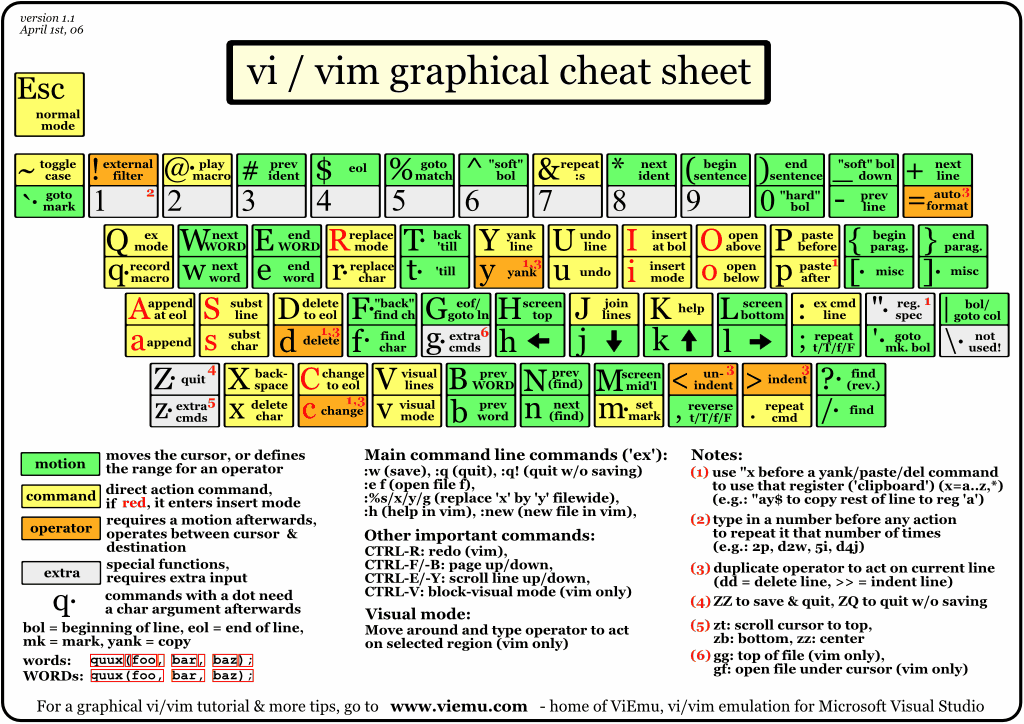
6.Vi/VIM Graphical Cheat-Sheet


This is a single page describing the full vi/vim input model, the function of all keys, and all major features. You can see it as a compressed vi/vim manual. (GIF format)

7.Firefox Keyboard and Mouse Shortcuts

Here is a list of Firefox keyboard and mouse shortcuts for each of the three major operating systems organized by topic.(HTML format)

8.Gimp Reference Card


Designed for Gimp version 1.2.2. (PDF format)

9.Debian Reference Card


The 101 most important things when using Debian GNU/Linux (last revision 2005-09-03). (PDF format)

10.Google Cheat Sheet

This two page Google Cheat Sheet lists all Google services and tools as well as background information. The Cheat Sheet offers a great reference to grasp of basic to advance Google query building concepts and ideas. (PDF format)

Password recovery tools are used to recover lost user and administrator passwords used to log on to Windows.

Password recovery tools are often called “password cracking” tools because they are sometimes used to “crack” unknown passwords by hackers. Legally cracking your own password is certainly a legitimate and often necessary practice!

Many Windows password recovery tools cost hundreds of dollars. Luckily there are a few completely free password recovery tools available that will help you recover forgotten Windows passwords fast!

Check out my list of the best free Windows password recovery tools available:

more and source:http://pcsupport.about.com/od/toolsofthetrade/tp/passrecovery.htm

As long as you’re the only user on your PC, deleting your Windows Vista account password will allow you to completely bypass the logon process. While it isn’t a very security-minded thing to do, removing your Windows Vista password might be something to consider if you have problems remembering your password.

Follow the easy steps below to remove the password to your Windows Vista logon account:

Difficulty: Easy
Time Required: Deleting your Windows Vista logon password usually takes less than a few minutes
Here’s How:

1. Click on Start and then Control Panel.

more and source:http://pcsupport.about.com/od/windowsvista/ht/rvistapassword.htm

While Apple’s Macs running OS X are without a doubt making inroads into the territory owned by Microsoft and PC makers with Windows machines, the fact of the matter is that the Redmond company and its OEM partners still account for the vast majority of the operating system and computer markets.

As far as consumer trends are concerned, there is a palpable shift from traditional desktops to laptops, and Microsoft is not only delivering Windows Vista, an operating system tailored to a mobile lifestyle, but it is also prepared to offer guidance on the acquisition of a new computer. From the Windows Guide library, the Redmond company has made available for download the Windows Laptop Selector Buying Basics.

“GHz? MBs? SDRAM? You don’t have to speak nerd to find a great laptop. Our Buying Basics makes it simple and straightforward to understand what you need to know when looking for your next PC,” reads an excerpt from the guide. Of course that the decision to buy a new machine orbits around money. “Many people see price as the biggest factor when buying a PC. A bargain-basement price may seem tempting now, but will it give you the laptop you want for the long haul? Technology changes rapidly and even if you spend less today, you might end up paying more tomorrow just to keep up with new software.”

Microsoft offers a comprehensive breakdown of what users should expect their machine to do, in accordance with a range of prices from $500 to over $3,500. But in addition to price, Microsoft is offering advice on aspects such as weight, speed, storage, screen size, ports, video and graphics, CD/DVD and even operating system. As far as the platform is concerned, all that Microsoft recommends is Windows Vista. However, that is understandable, now that Windows XP’s availability through the retail and OEM channels was discontinued at the end of June 2008, and Vista’s precursor is only available on ultra-low-cost desktops and laptops, from system builders and via downgrade rights.

Download the Windows Laptop Selector Buying Basics.

Thursday, December 4, 2008

Issue:

NTOSKRNL.EXE is missing or corrupt.

Related errors:


Below is a listing of the full error message that may be related to this error.

Windows NT could not start because the below file is missing or corrupt:

C:\Winnt\System32\Ntoskrnl.exe

Cause:

1. Keyboard issue
2. Miscellaneous corruption
3. Corrupt boot.ini file.
4. Missing boot.ini file.
5. Missing or corrupt ntoskrnl.exe file.
6. Windows NT installed on a partition bigger then 7.8GB
7. Corrupted hard disk drive or severely corrupted Windows.

Solution:


Keyboard issue


This issue has also been known to be caused by a short in the ground wire in the keyboard cable. Make sure this is not the cause of your error by replacing the keyboard with a different keyboard or simply just disconnecting the keyboard from the computer.

Miscellaneous corruption

Before trying any of the below recommendations it's recommend that you attempt to load the last known good configuration. Additional information about doing this can be found on document CH000626.

Corrupt boot.ini file

This issue is often caused when the boot.ini is missing or improperly configured. This issue often arises after a user has recently added or removed an operating system on the computer or added or removed hard disk drives in the computer.

Make sure the line pointing to the operating system and it's drive and partition is properly configured in the [boot loader] and [operating systems] section. Additional information about boot.ini can be found on document CH000492.

Missing boot.ini file

Microsoft Windows XP users:

If the boot.ini is severely corrupted or missing a user running Microsoft Windows XP can rebuild the boot.ini to resolve this issue. Additional information about rebuilding the boot.ini can be found on document CH000648.

Microsoft Windows NT and Windows 2000 users:

To restore the original boot.ini file in Microsoft Windows NT or Windows 2000 you will need an ERD and follow the below steps. If you do not have an ERD you will be unable to follow these steps.

1. Boot the computer with your Windows NT three setup diskettes or the Windows 2000 setup disc.
2. In the setup menu, type R to start the repair.
3. When prompted for the ERD diskette insert the diskette and inspect the startup environment.

Missing or corrupt ntoskrnl.exe file

If the ntoskrnl.exe file is corrupt or missing this can also generate the error. To restore this file follow the below steps.

1. Insert the Microsoft Windows XP CD. Note: If you have a recovery CD or a restore CD and not a Microsoft Windows XP CD it is likely the below steps will not resolve your issue.
2. Reboot the computer, as the computer is starting you should see a message to press any key to boot from the CD. When you see this message press any key.
3. In the Microsoft Windows XP setup menu press the R key to enter the recovery console.
4. Select the operating system you wish to fix, and then enter the administrator password.
5. Type expand d:\i386\ntoskrnl.ex_ c:\windows\system32
6. You will then be prompted if you wish to overwrite the file type Y and press enter to overwrite the file.
7. Type exit to reboot the computer.

Windows NT installed on a partition bigger then 7.8GB


If you are running Microsoft windows NT 4.0 on a partition larger than 7.8GB this issue can occur if the boot files are located outside this limitation. When this error occurs your computer will have the error message as shown below.

OS Loader v4.01
Disk I/O error status=00000001
Windows NT could not start because the below file is missing or corrupt: winnt\system32\Ntoskrnl.exe
Please reinstall a copy of the above file.

If your system partition is larger than 7.8GB you will need to delete the partition and recreate the partition to 7.8GB or less. Additional information about this issue can be found on Microsoft KB Q224526.

Corrupted hard disk drive or severely corrupted Windows

Attempt to check the hard disk drive for any errors by running the chkdsk error. To do this follow the below steps.

1. Insert the Microsoft Windows XP CD. Note: If you have a recovery CD or a restore CD and not a Microsoft Windows XP CD it is likely the below steps will not resolve your issue.
2. Reboot the computer, as the computer is starting you should see a message to press any key to boot from the CD. When you see this message press any key.
3. In the Microsoft Windows XP setup menu press the R key to enter the recovery console.
4. Select the operating system you wish to fix, and then enter the administrator password.
5. Once at the recovery console type chkdsk /r
6. Once completed type exit and see if issue is resolved.

If after trying all of the above steps you are still encountering the same issue it's likely that Windows is severely corrupted and it is recommended you attempt to reinstall Windows. Additional information about erasing the computer and starting over can be found on document CH000186.

Finally, if during the Windows installation you encounter errors it's likely that your hard disk drive is bad.

Monday, December 1, 2008

N+

Also known as the Network+, the N+ is a certification by CompTIA that helps demonstrate a person's knowledge in TCP/IP, maintaining and managing a network, network operating systems, and installing and upgrading networks. It's often recommended users with little or no network experience complete a Network+ certification before moving onto their MCSE or CNE certification.

Sunday, November 30, 2008

Issue:

NTLDR is Missing.


Related errors:

Below are the full error messages that may be seen when the computer is booting.

NTLDR is Missing
Press any key to restart

Boot: Couldn't find NTLDR
Please insert another disk

NTLDR is missing
Press Ctrl Alt Del to Restart
Cause:

1. Computer is booting from a non-bootable source.
2. Computer hard disk drive is not properly setup in BIOS.
3. Corrupt NTLDR and/or NTDETECT.COM file.
4. Misconfiguration with the boot.ini file.
5. Attempting to upgrade from a Windows 95, 98, or ME computer that is using FAT32.
6. New hard disk drive being added.
7. Corrupt boot sector / master boot record.
8. Seriously corrupted version of Windows 2000 or Windows XP.
9. Loose or Faulty IDE/EIDE hard disk drive cable.

Solutions:

Computer is booting from a non-bootable source


Many times this error is caused when the computer is attempting to boot from a non-bootable floppy disk or CD-ROM. First verify that no floppy diskette is in the computer, unless you are attempting to boot from a diskette.

If you are attempting to boot from a floppy diskette and are receiving this error message it is likely that the diskette does not have all the necessary files and/or is corrupt.

If you are attempting to install Windows XP or Windows 2000 and are receiving this error message as the computer is booting verify that your computer BIOS has the proper boot settings. For example, if you are attempting to run the install from the CD-ROM make sure the CD-ROM is the first boot device, and not the hard disk drive.

Second, when the computer is booting you should receive the below prompt.

Press any key to boot from the CD

Important: When you see this message press any key such as the Enter key immediately, otherwise it will try booting from the hard drive and likely get the NTLDR error again.

Note: If you are not receiving the above message and your BIOS boot options are set properly it's also possible that your CD-ROM drive may not be booting from the CD-ROM properly. Verify the jumpers are set properly on the CD-ROM drive. Additional information about checking the CD-ROM drive connections can be found on document CH000213.

Additional information: This error has also been known to occur when a memory stick is in a card reader and the computer is attempting to boot from it. If you have any type of card reader or flash reader make sure that no memory stick is inside the computer.

Computer hard disk drive is not properly setup in BIOS

Verify that your computer hard disk drive is properly setup in the BIOS / CMOS setup. Improper settings can cause this error. Additional information on how to enter the BIOS / CMOS setup can be found in document CH000192.

Corrupt NTLDR and/or NTDETECT.COM file

Windows 2000 users
Windows XP users

Windows 2000 users

If your computer is using Microsoft Windows 2000 and you are encountering the NTLDR error. Create the below boot.ini file on the floppy diskette drive.

[boot loader]
timeout=30
default=multi(0)disk(0)rdisk(0)partition(1)\WINNT
[operating systems]
multi(0)disk(0)rdisk(0)partition(1)\WINNT="Microsoft Windows 2000 Professional" /fastdetect

Copy the NTLDR and NTDETECT.COM files from another computer using the same operating system. Both of these files are located in the root directory of the primary hard disk drive. For example, C:\NTLDR and C:\NTDETECT.COM should be the locations of these files on many computers.

*

Please keep in mind that these files are hidden system files, if you need additional help with viewing hidden files in Windows please see document CH000516.

Once these files have been copied to a floppy diskette reboot the computer and copy the NTLDR and NTDETECT.COM files to the root directory of the primary hard disk drive. Below is an example of what commonly should be performed from the A:\> drive.

copy ntldr c:
copy ntdetect.com c:

After the above two files have been copied, remove the floppy diskette and reboot the computer.

Windows XP users

1. Insert the Windows XP bootable CD into the computer.
2. When prompted to press any key to boot from the CD, press any key.
3. Once in the Windows XP setup menu press the "R" key to repair Windows.
4. Log into your Windows installation by pressing the "1" key and pressing enter.
5. You will then be prompted for your administrator password, enter that password.
6. Copy the below two files to the root directory of the primary hard disk. In the below example we are copying these files from the CD-ROM drive letter, which in this case is "e." This letter may be different on your computer.

copy e:\i386\ntldr c:\
copy e:\i386\ntdetect.com c:\

7. Once both of these files have been successfully copied, remove the CD from the computer and reboot.

Misconfiguration with the boot.ini file


Edit the boot.ini on the root directory of the hard disk drive and verify that it is pointing to the correct location of your Windows operating system and that the partitions are properly defined. Additional information about the boot.ini can be found on document CH000492.

Attempting to upgrade from a Windows 95, 98, or ME computer that is using FAT32

If you are getting this error message while you are attempting to upgrade to Windows 2000 or Windows XP from Windows 95, Windows 98, or Windows ME running FAT32 please try the below recommendations.

1. Boot the computer with a Windows 95, Windows 98 or Windows ME bootable diskette.

2. At the A:\> prompt type:

sys c:

3. After pressing enter you should receive the "System Transferred" message. Once this has been completed remove the floppy diskette and reboot the computer.

New hard disk drive being added

If you are attempting to add a new hard disk drive to the computer make sure that drive is a blank drive. Adding a new hard disk drive to a computer that already has Windows installed on it may cause the NTLDR error to occur.

If you are unsure if the new drive is blank or not try booting from a bootable diskette and format the new hard disk drive.

Corrupt boot sector / master boot record

It's possible your computer's hard disk drive may have a corrupt boot sector and/or master boot record. These can be repaired through the Microsoft Windows Recovery console by running the fixboot and fixmbr commands.

Additional information and help in getting into the Microsoft Windows Recovery console can be found on document CH000627.

Seriously corrupted version of Windows 2000 or Windows XP


If you have tried each of the above recommendations that apply to your situation and you continue to experience this issue it is possible you may have a seriously corrupted version of Microsoft Windows. Therefore we would recommend you reinstall Microsoft Windows 2000 and Windows XP.

If you are encountering this issue during your setup you may wish to completely erase your computer hard disk drive and all of its existing data and then install Microsoft Windows 2000 / Windows XP. Additional information about erasing the computer and starting over can be found on document CH000186.

Loose or Faulty IDE/EIDE hard disk drive cable

This issue has been known to be caused by a loose or fault IDE/EIDE cable. If the above recommendation does not resolve your issue and your computer hard disk drive is using an IDE or EIDE interface. Verify the computer hard disk drive cable is firmly connected by disconnected and reconnecting the cable.

If the issue continues it is also a possibility that the computer has a faulty cable, try replacing the hard disk drive cable with another cable and/or a new cable.

Microsoft DOS is a command line user interface first introduced in 1981 for IBM computers and was last updated in 1994 when MS-DOS 6.22 was released. Although MS-DOS is not commonly used today, the command shell used through Microsoft Windows is. This page contains complete information about MS-DOS and the Windows command line.

Saturday, November 29, 2008

Databases provide a convenient means of storing vast amounts of information, allowing the information to be sorted, searched, viewed, and manipulated according to the business needs and goals. A computer database relies upon software to organize the storage of data. The software models the database structure in what are known as database models. The model in most common use today is the relational model. Other models such as the hierarchical model and the network model use a more explicit representation of relationships (see below for explanation of the various database models).

The first database management systems were developed in the 1960s. A pioneer in the field was Charles Bachman. Bachman's early papers show that his aim was to make more effective use of the new direct access storage devices becoming available: until then, data processing had been based on punched cards and magnetic tape, so that serial processing was the dominant activity.

While storing data is a great feature of databases, for many database users the most important feature is quick and simple retrieval of information. In a relational database, it is extremely easy to pull up information regarding an employee, but relational databases also add the power of running queries. Queries are requests to pull specific types of information and either show them in their natural state or create a report using the data. For instance, if you had a database of employees and it included tables such as salary and job description, you can easily run a query of which jobs pay over a certain amount. No matter what kind of information you store on your database, queries can be created using SQL to help answer important questions.

Databases can be very small (less than 1 MB) or extremely large and complicated (terabytes as in many government databases). However, all databases are usually stored and located on hard disk or other types of storage devices and are accessed via computer. Large databases may require separate servers and locations, but many small databases can fit easily as files located on your computer's hard drive.

Obviously, many databases store confidential and important information that should not be easily accessed by just anyone. Many databases require passwords and other security features in order to access the information. While some databases can be accessed via the internet through a network, other databases are closed systems and can only be accessed on site.

The need for database maintenance is unavoidable, so enterprise data availability software solutions have been created to help businesses reduce downtime from hours or days to mere minutes or even seconds. Effective database management applications can reduce or eliminate downtime that renders a database unavailable, giving business owners and developers a flexible and powerful tool to protect the performance of their valuable business operations.

Companies which provide enterprise data availability software and services help businesses manage their databases by offering services such as backup and recovery, automation of maintenance tasks, and fine tuning performance efficiency, among others. With an assessment of current database maintenance practices, enterprise data availability companies can recommend the appropriate system to implement that can solve the database management shortfalls of most organizations, playing a valuable role in the protection and longevity of their clients.

Laptop has the advantage in battery technology and the advent of functional, large-screen, liquid crystal displays (LCDs), the first truly portable computers, referred to as laptops, were produced in the late 1980s. These units featured integrated AT-compatible computer boards, including I/O (input/output) and video controller functions. Laptops, as mentioned, usually feature a folding LCD display and a built-in keyboard and pointing device. They also use an external power supply and a removable, rechargeable battery. Today's laptops have fairly large (2 GB or more) hard drives, a CD-ROM drive (or DVD drive), and a floppy disk drive (often the latter two are interchangeable plug-ins).

The laptops are originally appeared on the market, they were the smallest portable computers made. Today, they are high-end machines that offer features and performance comparable to a desktop system. These are all the Advantage of laptops.

The Types of portables computers are as described below and it main features of it also described below it is useful for many peoples from all over the world and it also the important and easy thing to do. Portable computers are classified according to size and function. Today there are three basic types of portable computers: laptops, notebooks, and subnotebooks.

The first "portable" computers were often called "luggables." The size of a portable sewing machine, they tipped the scales at 30 pounds. Equipped with a small CRT (cathode-ray tube) display, they were actually a traditional PC in a slightly smaller case.

This are the main types of portables computers that were daily used routinely by the peoples all over the world. The real change in portable computers came with the advent of the flat-panel display, allowing the portable to take on the now-familiar slim design. Laptop is the term used for the heavier version, usually offering most of the features of a full-fledged PC but with a folding flat-panel display and integrated keyboard. Notebooks are slender devices that often lack the full range of storage as part of the normal configuration. PDAs, a special group of products offering a subset of features including e-mail, schedule tracking, contact records, and limited note taking and Web browsing, are beyond the scope of this chapter and it are all the main feature of portables that wre in daily usage purposes.

Tuesday, November 25, 2008

PDF is a great portable format. With a free software from www.primopdf.com called PrimoPDF, the task of converting any file to PDF format has never been easier. The installer from the download section is about 10.8MB as of this writing. After you installed it you can see it as one of the existing printers available on your list of printers:


This means any document, text, file or picture is printable to PrimoPDF. It will not print a hard copy of your chosen document but rather a soft PDF version. Once you try to print to this “printer” it will prompt with you with this window:


The PrimoPDF window acts like a “Save As” screen where you can specify the file name of the PDF file. Click “Create PDF” after you put the right file name. After you press the Create PDF button it will open your default PDF reader program with the PDF file you just created.

The PrimoPDF has some choices as options that you can choose from located on the upper part of the window:


The Screen mode produces a PDF optimized for screen viewing. This configuration creates small PDF files and reduces image resolution to 72 dpi. If your original document has a higher resolution then this may reduce print quality. This is useful when you want to convert a large document into a compact sized PDF. This is probably suitable for users who use a small screen as users with bigger monitors might be turned of by a document with a low resolution .

The Print mode produces a PDF optimized for printing to most home and office printers. Use this if you plan to release a hardcopy but not the softcopy.

Probably the most versatile format for any screen is the eBook option. It produces a PDF optimized for eBook usage. This configuration creates average-sized PDF files and compresses all images, optimizing the file for downloading and viewing on a variety of screens.

If you need more quality of resolution and font portability then choose Prepress. It is suitable for printing to commercial-quality printers. This mode creates large PDF files and will automatically embed all fonts and high resolution images for best results when printed.

The Custom mode allows you to use your own settings. Use this if the other modes does not match your needed result.

Overall, PrimoPDF does its job well. It has configurable modes that you can use for a variety of PDF needs. It is easy to pickup since it acts like a printer the way it was setup.

Do you have a company blog or webpage about your product or service and you want to start getting feedback from your customers/users/readers? I was very excited when Dell started their IdeaStorm website meant to get direct customer feedback from customers.

That’s one of the main reasons they released a new line of consumer Linux PCs and Linux servers. So if you are looking a way to get feedback on your products, services, or even your blog, then check out UserVoice.

UserVoice is a free service for service for small businesses, startups, non-profits, bloggers, or anyone who wants to get feedback from other people about something on their website or blog.


With UserVoice, you can create your own UserVoice webpage where users can offer new ideas or vote up existing ideas using a professional quality feedback system. Basically the way it works is that users vote, a consensus builds, you can respond or discuss officially, and finally you can implement the requests.


This is a great tool for small businesses that don’t have the resources to set up complicated web feedback services. With UserVoice, you don’t have to worry about hosting, about setting up a website, worrying about user emails, support tickets, forums, etc.

Here’s what a UserVoice feedback webpage for a made-up company looks like:


This is also a great way for teams to work together, suggest ideas for a project, and let other team members vote on which ideas are the best. For me, it would be great for our software team to help decide which features we want to include in a product, etc.

After development, it would be great to let software users suggest and vote on new features or problems. Overall, it’s a great product and one that the company uses itself! Apparently the top item is to support multiple languages!

Currently you can only use UserVoice off their domain name like mycompany.uservoice.com, but eventually they will support embedding the feedback system into your own website. Also, it’s currently free, but they do offer an Enterprise edition which apparently will have more features for a certain price. Enjoy!

LockBin basically worked by encrypting the text message using some kind of hash function like MD5 or SHA1. If you really want to send an encrypted email, why not just encrypt the text yourself! You can setup Outlook for encryption, but it’s very technical and requires lots of other services in order to work correctly.

A simple way to encrypt a text message is to use a free online tool like the Encrypt/Decrypt tool provided by WebMax.


The tool is pretty straightforward, just type in your text and choose the hash function you want to use to encode or encrypt it in. So type in your secret message and click MD5 Encrypt or SHA1 Encrypt for the strongest encryption possible.

Now just email the encrypted text in a normal email to someone and call them and tell them to go to the same site, paste the text and click the appropriate decrypt button at the right! Of course you should never EMAIL the person telling them how to do this because if the email is intercepted, it would be pretty easy for a hacker to decrypt the message.


Once the other person knows, you can rest assured that any text you send will not be readable by anyone unless they know to go to this website. Go to the website and paste in the following SHA1 encrypted text and click SHA1 Decrypt and see my “secret” message:

d8f5588440aba29feee577e9a306e0ab52cf1201

Pretty nifty eh? Very useful if you want to quickly send something very confidential or sensitive to someone via email or instant message, etc. Just make sure that no one else gets to know about the website other than the people you want to share private information with.

If you currently use some other method to send secure encrypted emails or messages across the Internet, let us know in the comments! Enjoy! Source:

MakeUseOf

Monday, November 24, 2008


Through MMS, it is sweeping the world under disguises such as Beauty.jpg, Sex.mp3, or Love.rm. Once it gets into your mobile phone, which runs through SymbianOS, you are presented an installation dialogue upon clicking on the malicious attachment. As you are deceived by its guises, you will then install it. And when it gets installed, the worm collect all your contact, then targeting them, and finally sending to them an MMS file carrying its packed SIS (or Symbian Installation Source) version. Apart from that, this worm can also send its copies via generated mobile phone numbers. Yes, it is Beselo, the fearful SymbianOS Worm.

But the fun days are over for Beselo, for Secure Mobile Systems (or SMobile Systems) has developed a software that can fight the horrible worm. SMobile Systems has created a mobile anti-virus update and cleaning tool, and introduced it to their Security Shield platform for mobile phones. With that, the mobile phones are protected from any Beselo worm, and, if already infected, are disinfected by the cleaning tool.


According to a press release, George Tuvell, chief technology officer of SMobile, said that SMobile has been at the forefront of monitoring and protecting mobile phone companies and their users and subscribers against malware attacks such as Beselo. “Sadly, this worm proves that mobile viruses are no longer ‘theoretical’ in nature,” Tuvell added.

Beselo had been attacking mobile phones using Symbian S60, some of which are Nokia’s 6630, 7610, 6680, and N70. “This is a particularly insidious virus that is smarter in design, and ultimately more dangerous to consumers, corporate smart phone users and to the carriers who provide service to mobile customers, than nearly any previous attack that has gotten into the wild,” Tuvell said.

It is, by far, safe to say that Beselo is just a part of the past. Relatively, mobile phone attacks by malicious software are still considered rare nowadays that there really isn’t much commotion created from malware attack reports. However, mobile companies worry that modifications of this Beselo worm can easily frighten the mobile market yet again, before new measures against the new worm are developed. Loki